> ## Documentation Index
> Fetch the complete documentation index at: https://arizeai-433a7140.mintlify.site/llms.txt
> Use this file to discover all available pages before exploring further.
# AG2 Tracing
> Auto-instrument your AG2 multi-agent application for seamless observability
export const projectName_0 = "ag2-tracing"
[AG2](https://github.com/ag2ai/ag2) is an open-source Python framework for building multi-agent
LLM applications. AG2 1.x is a ground-up redesign of the framework: it ships as the `ag2`
package, is imported as `ag2`, and is built around an `Agent` primitive, a middleware pipeline,
tools, and multi-agent networks.
The 0.x line — imported as `autogen` — is maintained as **AG2 Classic** and uses a different
API built around `ConversableAgent`. Phoenix traces both, through different mechanisms:
| Line | Import | How Phoenix traces it |
| ------------------ | --------- | -------------------------------------------------------- |
| AG2 1.x | `ag2` | AG2's built-in `TelemetryMiddleware`, exported over OTLP |
| AG2 Classic (0.14) | `autogen` | `openinference-instrumentation-ag2` |
Pick the section below that matches the line you are on.
## AG2 1.x
AG2 1.x emits OpenTelemetry spans natively through `TelemetryMiddleware`, following the
[OpenTelemetry GenAI semantic conventions](https://opentelemetry.io/docs/specs/semconv/gen-ai/).
No OpenInference instrumentor is required — point the middleware at Phoenix's OTLP endpoint and
Phoenix converts the `gen_ai.*` attributes to OpenInference at ingest.
GenAI semantic convention auto-conversion requires `arize-phoenix` 15.10.0 or later. See
[Translating Semantic Conventions](/docs/phoenix/tracing/concepts-tracing/translating-conventions)
for details.
### Install
```bash theme={"theme":{"light":"github-light-default","dark":"github-dark-default"}}
pip install "ag2[openai,tracing]" arize-phoenix-otel arize-phoenix
```
The `tracing` extra pulls in the OpenTelemetry SDK that `TelemetryMiddleware` needs. Swap
`openai` for whichever provider extra your agent uses (`anthropic`, `gemini`, `ollama`, …).
### Setup
Use `register` to build a tracer provider that exports to Phoenix, then hand that provider to
`TelemetryMiddleware`. Leave `auto_instrument` off for this path — `TelemetryMiddleware` already
emits the LLM spans, so an additional provider instrumentor would double-record every call.
```python theme={"theme":{"light":"github-light-default","dark":"github-dark-default"}}
import asyncio
from ag2 import Agent
from ag2.config import OpenAIConfig
from ag2.middleware.builtin import TelemetryMiddleware
from phoenix.otel import register
# register() returns an OpenTelemetry TracerProvider that exports to Phoenix
tracer_provider = register(project_name="ag2-tracing")
agent = Agent(
"assistant",
prompt="You are a helpful assistant.",
config=OpenAIConfig(model="gpt-4o-mini"),
middleware=[
TelemetryMiddleware(tracer_provider=tracer_provider, agent_name="assistant"),
],
)
async def main() -> None:
reply = await agent.ask("What is the capital of France?")
print(reply.body)
asyncio.run(main())
```
### What gets traced
`TelemetryMiddleware` wraps each stage of the agent loop. Phoenix maps the GenAI operation name
onto an OpenInference span kind:
| AG2 hook | `gen_ai.operation.name` | Phoenix span kind |
| ----------------------------------- | ----------------------- | ----------------- |
| `on_turn` — a full turn | `invoke_agent` | `AGENT` |
| `on_llm_call` — each LLM call | `chat` | `LLM` |
| `on_tool_execution` — each tool | `execute_tool` | `TOOL` |
| `on_human_input` — each HITL prompt | `await_human_input` | *(generic span)* |
A single `ask()` therefore produces an `AGENT` root span with the LLM and tool calls nested
beneath it:
```
invoke_agent assistant [AGENT]
├── chat gpt-4o-mini [LLM]
├── execute_tool get_weather [TOOL]
└── chat gpt-4o-mini [LLM]
```
Token counts (`gen_ai.usage.input_tokens` / `output_tokens`, plus prompt-cache reads and writes)
are converted to Phoenix's token-count attributes, so cost and usage roll up automatically.
### Redacting span content
`TelemetryMiddleware` captures message content, tool arguments, and tool results by default. To
keep prompts and results out of your traces, set `capture_content=False`:
```python theme={"theme":{"light":"github-light-default","dark":"github-dark-default"}}
TelemetryMiddleware(
tracer_provider=tracer_provider,
agent_name="assistant",
capture_content=False,
)
```
## AG2 Classic (0.14)
AG2 Classic centers on the `ConversableAgent`, which agents use to chat with one another, call
tools, and coordinate through group chats and sequential conversations.
Phoenix instruments AG2 Classic through the `openinference-instrumentation-ag2` package. Calling
`AG2Instrumentor().instrument()` patches `ConversableAgent` and emits spans for chats, replies,
and tool executions, nesting them correctly through group chat orchestration.
`openinference-instrumentation-ag2` targets AG2 Classic (`ag2>=0.14,<1.0`, imported as
`autogen`). It does not instrument AG2 1.x — use the AG2 1.x section above for that.
### Install
```bash theme={"theme":{"light":"github-light-default","dark":"github-dark-default"}}
pip install openinference-instrumentation-ag2 openinference-instrumentation-openai "ag2[openai]<1.0" arize-phoenix-otel arize-phoenix
```
AG2 Classic delegates its LLM calls to the underlying model client. Pair the AG2 instrumentor
with the instrumentor for that provider — `openinference-instrumentation-openai` in the examples
below — so the LLM spans appear nested under the agent spans. If your agents call a different
provider, install and register that provider's OpenInference instrumentor instead.
### Setup
Use the `register` function to connect your application to Phoenix. Because AG2 Classic relies on
a separate model instrumentor for LLM visibility, keep `auto_instrument=True` so both the AG2 and
model instrumentors are activated from your installed dependencies.
Connect your application to Phoenix with the `register` function:
{`from phoenix.otel import register
# configure the Phoenix tracer
tracer_provider = register(
project_name="${projectName_0}", # Default is 'default'
auto_instrument=True # Auto-instrument your app based on installed OI dependencies
)`}
### Run AG2 Classic
From here you can use AG2 Classic as normal, and Phoenix will trace each agent chat, reply, and
tool call. The example below runs a single agent with the quickstart `run()` API:
```python theme={"theme":{"light":"github-light-default","dark":"github-dark-default"}}
import os
from autogen import ConversableAgent, LLMConfig
llm_config = LLMConfig(
{"api_type": "openai", "model": "gpt-4o-mini", "api_key": os.environ["OPENAI_API_KEY"]}
)
agent = ConversableAgent(
name="helpful_agent",
system_message="You are a helpful assistant.",
llm_config=llm_config,
)
response = agent.run(message="What is the capital of France?", max_turns=1, user_input=False)
response.process()
```
### What gets traced
The instrumentor patches `ConversableAgent` and produces three span kinds:
| AG2 Classic method | Span name | Span kind |
| ----------------------------------------------------------------------------- | ------------------------ | --------- |
| `initiate_chat` / `a_initiate_chat` (also used by `run` and `initiate_chats`) | `.initiate_chat` | `AGENT` |
| `generate_reply` / `a_generate_reply` | `.generate_reply` | `AGENT` |
| `execute_function` / `a_execute_function` | `` | `TOOL` |
Tool spans carry `tool.name`, `tool_call.id`, `tool_call.function.arguments`, and
`tool.parameters` with resolved parameter types. The instrumentor also supports suppressing
tracing, propagating context attributes (`using_session`, `using_user`, `using_attributes`), and
masking sensitive data with a `TraceConfig`.
### Examples
#### Tool calling
An LLM-driven tool call, split across an agent that decides to call the tool and a user proxy
that executes it — the registration split AG2 Classic uses throughout its tools guide.
```python expandable theme={"theme":{"light":"github-light-default","dark":"github-dark-default"}}
import os
from typing import Annotated
from autogen import ConversableAgent, LLMConfig
from phoenix.otel import register
# auto_instrument activates the installed AG2 and OpenAI OpenInference instrumentors
register(project_name="ag2-tool-calling", auto_instrument=True)
llm_config = LLMConfig(
{"api_type": "openai", "model": "gpt-4o-mini", "api_key": os.environ["OPENAI_API_KEY"]}
)
RATES = {("USD", "EUR"): 0.92, ("EUR", "USD"): 1.09, ("USD", "JPY"): 157.0}
assistant = ConversableAgent(
name="assistant",
system_message=(
"You convert currencies using the provided tool. Once you have the answer, "
"state it and reply TERMINATE."
),
llm_config=llm_config,
)
user_proxy = ConversableAgent(
name="user_proxy",
human_input_mode="NEVER",
is_termination_msg=lambda message: "TERMINATE" in (message.get("content") or ""),
)
@user_proxy.register_for_execution()
@assistant.register_for_llm(description="Convert an amount between two currencies.")
def get_exchange_rate(
amount: Annotated[float, "The amount to convert"],
base: Annotated[str, "The currency code to convert from, e.g. USD"],
quote: Annotated[str, "The currency code to convert to, e.g. EUR"],
) -> str:
rate = RATES.get((base.upper(), quote.upper()))
if rate is None:
return f"No exchange rate available for {base} to {quote}."
return f"{amount} {base.upper()} is {amount * rate:.2f} {quote.upper()}."
user_proxy.initiate_chat(assistant, message="How much is 250 USD in EUR?", max_turns=4)
```
#### Group chat
An `AutoPattern` group chat where a manager routes between specialist agents. The trace shows the
manager's speaker-selection decisions interleaved with each specialist's reply:
```
_User.initiate_chat [AGENT]
chat_manager.generate_reply [AGENT]
finance_bot.generate_reply [AGENT]
ChatCompletion [LLM]
checking_agent.initiate_chat [AGENT]
speaker_selection_agent.generate_reply [AGENT]
ChatCompletion [LLM]
summary_bot.generate_reply [AGENT]
ChatCompletion [LLM]
```
```python expandable theme={"theme":{"light":"github-light-default","dark":"github-dark-default"}}
import os
from typing import Any
from autogen import ConversableAgent, LLMConfig
from autogen.agentchat import initiate_group_chat
from autogen.agentchat.group.patterns import AutoPattern
from phoenix.otel import register
# auto_instrument activates the installed AG2 and OpenAI OpenInference instrumentors
register(project_name="ag2-group-chat", auto_instrument=True)
llm_config = LLMConfig(
{"api_type": "openai", "model": "gpt-4o-mini", "api_key": os.environ["OPENAI_API_KEY"]}
)
TRANSACTIONS = [
"Transaction: $500 to Staples. Memo: Quarterly supplies.",
"Transaction: $23,000 to CyberSins Ltd. Memo: Confidential.",
"Transaction: $1,500 to Initech. Memo: Routine payment.",
]
FINANCE_SYSTEM_MESSAGE = """
You are a financial compliance assistant reviewing transactions.
Flag a transaction as suspicious when the amount is over $10,000 or the memo is vague.
Approve the rest. Review every transaction in one reply, then hand off to summary_bot.
"""
SUMMARY_SYSTEM_MESSAGE = """
You are a financial summary assistant. Summarize the reviewed transactions as a markdown
table with Vendor, Memo, Amount, and Status columns, followed by the approved and
rejected counts. End your reply with "==== SUMMARY GENERATED ====".
"""
def is_termination_msg(message: dict[str, Any]) -> bool:
return "==== SUMMARY GENERATED ====" in (message.get("content") or "")
finance_bot = ConversableAgent(
name="finance_bot", system_message=FINANCE_SYSTEM_MESSAGE, llm_config=llm_config
)
summary_bot = ConversableAgent(
name="summary_bot", system_message=SUMMARY_SYSTEM_MESSAGE, llm_config=llm_config
)
pattern = AutoPattern(
initial_agent=finance_bot,
agents=[finance_bot, summary_bot],
group_manager_args={"llm_config": llm_config, "is_termination_msg": is_termination_msg},
)
result, _, _ = initiate_group_chat(
pattern=pattern,
messages="Please review these transactions:\n" + "\n".join(TRANSACTIONS),
max_rounds=6,
)
```
#### Sequential chats
`initiate_chats` runs a queue of chats in order, passing each chat's summary into the next as
carryover. Each chat in the queue gets its own `AGENT` span, so the trace shows the whole
pipeline:
```python expandable theme={"theme":{"light":"github-light-default","dark":"github-dark-default"}}
import os
from autogen import ConversableAgent, LLMConfig
from phoenix.otel import register
# auto_instrument activates the installed AG2 and OpenAI OpenInference instrumentors
register(project_name="ag2-sequential-chats", auto_instrument=True)
llm_config = LLMConfig(
{"api_type": "openai", "model": "gpt-4o-mini", "api_key": os.environ["OPENAI_API_KEY"]}
)
researcher = ConversableAgent(
name="researcher",
system_message="List the key facts about the topic in three short bullets.",
llm_config=llm_config,
)
writer = ConversableAgent(
name="writer",
system_message="Turn the research you are given into a two-sentence summary.",
llm_config=llm_config,
)
editor = ConversableAgent(
name="editor",
system_message="Tighten the summary you are given into a single sentence.",
llm_config=llm_config,
)
coordinator = ConversableAgent(name="coordinator", human_input_mode="NEVER")
# Each chat's summary is carried into the next chat in the queue.
results = coordinator.initiate_chats(
[
{
"recipient": researcher,
"message": "Research the benefits of tracing LLM applications.",
"max_turns": 1,
"summary_method": "last_msg",
},
{
"recipient": writer,
"message": "Write the summary.",
"max_turns": 1,
"summary_method": "last_msg",
},
{
"recipient": editor,
"message": "Edit it down.",
"max_turns": 1,
"summary_method": "last_msg",
},
]
)
```
#### Structured outputs
Passing a pydantic model as `response_format` on `LLMConfig` makes the agent reply with JSON
matching that schema. The agent span's output value is the serialized model, so the trace shows
exactly what downstream code will parse:
```python expandable theme={"theme":{"light":"github-light-default","dark":"github-dark-default"}}
import json
import os
from autogen import ConversableAgent, LLMConfig
from phoenix.otel import register
from pydantic import BaseModel
# auto_instrument activates the installed AG2 and OpenAI OpenInference instrumentors
register(project_name="ag2-structured-output", auto_instrument=True)
class TransactionAuditEntry(BaseModel):
vendor: str
amount: float
memo: str
status: str
reason: str
class AuditLogSummary(BaseModel):
total_transactions: int
approved_count: int
rejected_count: int
transactions: list[TransactionAuditEntry]
llm_config = LLMConfig(
{"api_type": "openai", "model": "gpt-4o-mini", "api_key": os.environ["OPENAI_API_KEY"]},
response_format=AuditLogSummary,
)
TRANSACTIONS = """
Transaction: $500 to Staples. Memo: Quarterly supplies.
Transaction: $23,000 to CyberSins Ltd. Memo: Confidential.
Transaction: $1,500 to Initech. Memo: Routine payment.
"""
summary_bot = ConversableAgent(
name="summary_bot",
system_message=(
"You are a financial summary assistant that generates audit logs. Reject "
"transactions over $10,000 or with a vague memo, and approve the rest."
),
llm_config=llm_config,
)
response = summary_bot.run(
message=f"Produce the audit log for these transactions:\n{TRANSACTIONS}",
max_turns=1,
user_input=False,
)
response.process()
audit_log = AuditLogSummary.model_validate_json(response.messages[-1]["content"])
print(json.dumps(audit_log.model_dump(), indent=2))
```
### Migrating from `openinference-instrumentation-autogen`
`openinference-instrumentation-ag2` replaces `openinference-instrumentation-autogen`. The
`autogen` instrumentor is now a thin, deprecated compatibility facade that delegates to
`AG2Instrumentor`. Move to `openinference-instrumentation-ag2` and use `AG2Instrumentor`
directly.
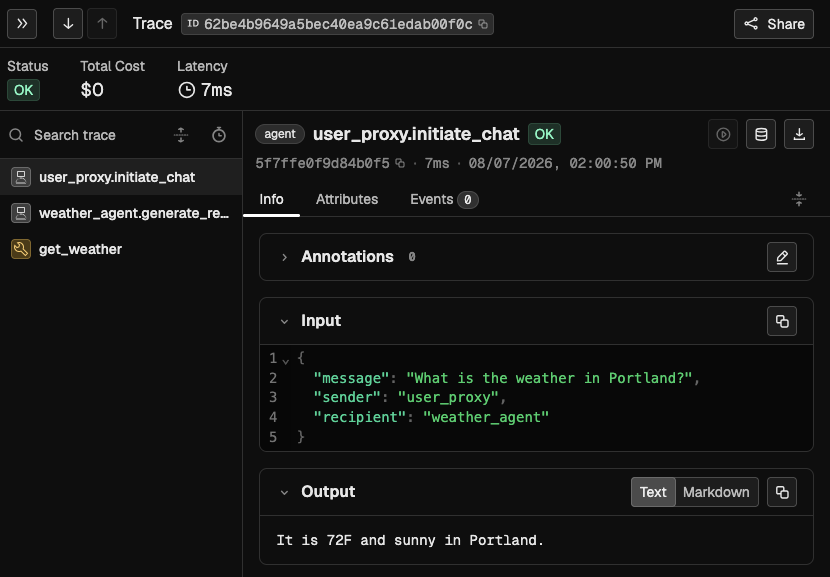
## Observe
Once tracing is set up, all AG2 agent turns, LLM calls, and tool calls are streamed to Phoenix
for observability and evaluation. Agent turns appear as `AGENT` spans, with LLM calls and tool
executions nested underneath as `LLM` and `TOOL` spans.
 ## Resources
* [AG2 telemetry guide](https://docs.ag2.ai/) — `TelemetryMiddleware` reference for AG2 1.x
* [OpenInference package](https://pypi.org/project/openinference-instrumentation-ag2/) — AG2 Classic instrumentor
* [Example scripts](https://github.com/Arize-ai/openinference/tree/main/python/instrumentation/openinference-instrumentation-ag2/examples)
## Resources
* [AG2 telemetry guide](https://docs.ag2.ai/) — `TelemetryMiddleware` reference for AG2 1.x
* [OpenInference package](https://pypi.org/project/openinference-instrumentation-ag2/) — AG2 Classic instrumentor
* [Example scripts](https://github.com/Arize-ai/openinference/tree/main/python/instrumentation/openinference-instrumentation-ag2/examples)