

ag2
package, is imported as ag2, and is built around an Agent primitive, a middleware pipeline,
tools, and multi-agent networks.
The 0.x line — imported as autogen — is maintained as AG2 Classic and uses a different
API built around ConversableAgent. Phoenix traces both, through different mechanisms:
Pick the section below that matches the line you are on.
AG2 1.x
AG2 1.x emits OpenTelemetry spans natively throughTelemetryMiddleware, following the
OpenTelemetry GenAI semantic conventions.
No OpenInference instrumentor is required — point the middleware at Phoenix’s OTLP endpoint and
Phoenix converts the gen_ai.* attributes to OpenInference at ingest.
GenAI semantic convention auto-conversion requires
arize-phoenix 15.10.0 or later. See
Translating Semantic Conventions
for details.Install
tracing extra pulls in the OpenTelemetry SDK that TelemetryMiddleware needs. Swap
openai for whichever provider extra your agent uses (anthropic, gemini, ollama, …).
Setup
Useregister to build a tracer provider that exports to Phoenix, then hand that provider to
TelemetryMiddleware. Leave auto_instrument off for this path — TelemetryMiddleware already
emits the LLM spans, so an additional provider instrumentor would double-record every call.
What gets traced
TelemetryMiddleware wraps each stage of the agent loop. Phoenix maps the GenAI operation name
onto an OpenInference span kind:
A single
ask() therefore produces an AGENT root span with the LLM and tool calls nested
beneath it:
gen_ai.usage.input_tokens / output_tokens, plus prompt-cache reads and writes)
are converted to Phoenix’s token-count attributes, so cost and usage roll up automatically.
Redacting span content
TelemetryMiddleware captures message content, tool arguments, and tool results by default. To
keep prompts and results out of your traces, set capture_content=False:
AG2 Classic (0.14)
AG2 Classic centers on theConversableAgent, which agents use to chat with one another, call
tools, and coordinate through group chats and sequential conversations.
Phoenix instruments AG2 Classic through the openinference-instrumentation-ag2 package. Calling
AG2Instrumentor().instrument() patches ConversableAgent and emits spans for chats, replies,
and tool executions, nesting them correctly through group chat orchestration.
openinference-instrumentation-ag2 targets AG2 Classic (ag2>=0.14,<1.0, imported as
autogen). It does not instrument AG2 1.x — use the AG2 1.x section above for that.Install
openinference-instrumentation-openai in the examples
below — so the LLM spans appear nested under the agent spans. If your agents call a different
provider, install and register that provider’s OpenInference instrumentor instead.
Setup
Use theregister function to connect your application to Phoenix. Because AG2 Classic relies on
a separate model instrumentor for LLM visibility, keep auto_instrument=True so both the AG2 and
model instrumentors are activated from your installed dependencies.
Connect your application to Phoenix with the register function:
Run AG2 Classic
From here you can use AG2 Classic as normal, and Phoenix will trace each agent chat, reply, and tool call. The example below runs a single agent with the quickstartrun() API:
What gets traced
The instrumentor patchesConversableAgent and produces three span kinds:
Tool spans carry
tool.name, tool_call.id, tool_call.function.arguments, and
tool.parameters with resolved parameter types. The instrumentor also supports suppressing
tracing, propagating context attributes (using_session, using_user, using_attributes), and
masking sensitive data with a TraceConfig.
Examples
Tool calling
An LLM-driven tool call, split across an agent that decides to call the tool and a user proxy that executes it — the registration split AG2 Classic uses throughout its tools guide.Group chat
AnAutoPattern group chat where a manager routes between specialist agents. The trace shows the
manager’s speaker-selection decisions interleaved with each specialist’s reply:
Sequential chats
initiate_chats runs a queue of chats in order, passing each chat’s summary into the next as
carryover. Each chat in the queue gets its own AGENT span, so the trace shows the whole
pipeline:
Structured outputs
Passing a pydantic model asresponse_format on LLMConfig makes the agent reply with JSON
matching that schema. The agent span’s output value is the serialized model, so the trace shows
exactly what downstream code will parse:
Migrating from openinference-instrumentation-autogen
openinference-instrumentation-ag2 replaces openinference-instrumentation-autogen. The
autogen instrumentor is now a thin, deprecated compatibility facade that delegates to
AG2Instrumentor. Move to openinference-instrumentation-ag2 and use AG2Instrumentor
directly.
Observe
Once tracing is set up, all AG2 agent turns, LLM calls, and tool calls are streamed to Phoenix for observability and evaluation. Agent turns appear asAGENT spans, with LLM calls and tool
executions nested underneath as LLM and TOOL spans.
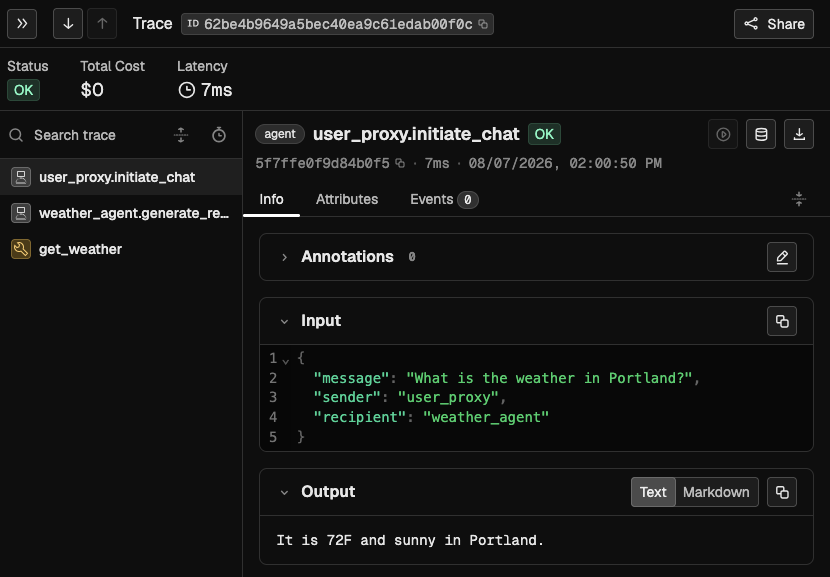
An AG2 trace in Phoenix
Resources
-
AG2 telemetry guide —
TelemetryMiddlewarereference for AG2 1.x - OpenInference package — AG2 Classic instrumentor
- Example scripts